




Playing bingo from your mobile has become the go-to way for millions of UK players to enjoy their favourite game. Whether you’re on the bus, waiting in a queue, or just lounging on the sofa, mobile bingo apps let you jump into a game whenever the mood takes you. But with so many options out there, it helps to know what to look for and how mobile bingo apps actually work.
How Do Mobile Bingo Apps Work?
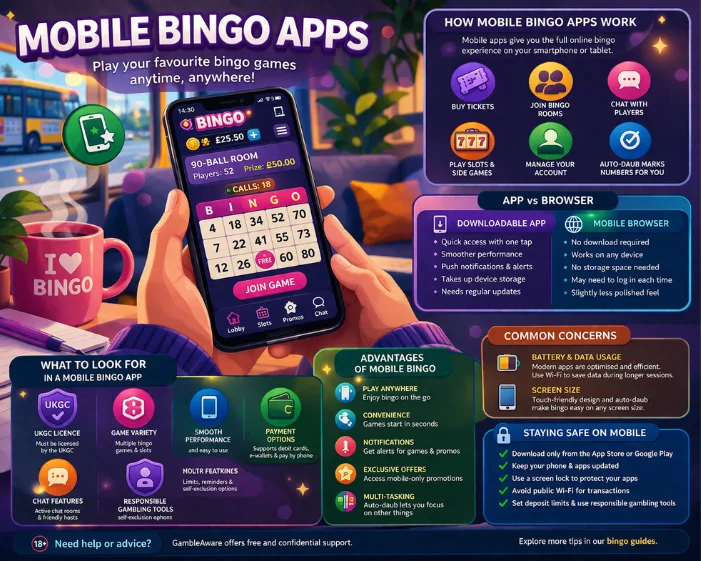
Mobile bingo apps bring the full online bingo experience to your smartphone or tablet. You can buy tickets, join bingo rooms, chat with other players, play side games, and manage your account, all from the palm of your hand. Most apps support the same range of games you’d find on the desktop site, including 90-ball, 75-ball, and other bingo variants, plus slots and instant win games.
The games are designed to work smoothly on smaller screens, with touch-friendly controls and optimised layouts. Auto-daub is standard on mobile, so your numbers are marked off automatically – you don’t need to worry about missing a call because you were trying to tap the right square on a small screen.
Downloadable Apps vs Mobile Browser
There are two main ways to play bingo on your mobile: through a dedicated downloadable app or directly through your mobile browser. Both have their advantages, and which one you prefer largely comes down to personal preference.
Downloadable apps are installed directly on your device from the App Store (for iPhones and iPads) or Google Play (for Android devices). Once installed, you can launch them with a single tap. They tend to run a bit more smoothly than browser-based play, and they can send you push notifications about upcoming games, promotions, and wins. The downside is they take up storage space on your device, and you’ll need to keep them updated.
Mobile browser play uses HTML5 web technology to deliver the bingo experience through your phone’s browser, no download needed. Just visit the bingo site on your phone, log in, and start playing. Browser-based sites work on virtually any device with a modern browser, so there are no compatibility worries. However, you might need to log in each time you visit, and the experience can occasionally be less polished than a purpose-built app.
What to Look for in a Mobile Bingo App
Not all mobile bingo apps are created equal. Here are some things to check before you download or start playing:
- UKGC licence– this is non-negotiable. Any app or site offering real-money bingo to UK players must hold a valid UK Gambling Commission licence. Check the app description or the site’s footer for licensing details.
- Game variety– a good mobile bingo app should offer multiple bingo rooms and game types, plus a decent selection of side games like slots and scratch cards.
- Smooth performance– the app should load quickly, run without crashing, and handle transitions between games and menus seamlessly.
- Payment options– check that your preferred payment method is supported. Most mobile apps accept debit cards, e-wallets like PayPal, and pay-by-phone options. Note that credit cards cannot be used for gambling in the UK.
- Chat features– a big part of the bingo experience is the social side. Make sure the app includes chat rooms so you can interact with other players and chat hosts.
- Responsible gambling tools– look for deposit limits, session time reminders, and self-exclusion options within the app.
Advantages of Playing Bingo on Mobile
There are plenty of reasons why mobile bingo has become so popular:
- Play anywhere– as long as you have a data connection or Wi-Fi, you can play bingo from literally anywhere.
- Convenience– no need to sit at a computer. Pick up your phone, open the app, and you’re in a game within seconds.
- Notifications– downloadable apps can alert you to special promotions, jackpot games, and other events you might otherwise miss.
- Exclusive offers– some bingo sites run mobile-only promotions to encourage players to use their app.
- Multi-tasking– with auto-daub running, you can chat, play side games, or even do other things on your phone while your bingo cards are being marked off automatically.
Common Concerns About Mobile Bingo
Some players worry about things like battery drain, data usage, and screen size when playing on mobile. Here’s the good news: modern bingo apps are well-optimised and shouldn’t hammer your battery or chew through your data allowance too quickly. That said, if you’re on a limited data plan, it’s worth playing on Wi-Fi when possible – especially if you’re playing for extended sessions.
As for screen size, even on smaller phones, the experience is perfectly playable. Apps are designed with mobile screens in mind, and auto-daub means you don’t need to manually tap tiny squares.
Staying Safe on Mobile
Playing bingo on your phone is just as safe as playing on a desktop, provided you take sensible precautions:
- Only download apps from official sources – the App Store or Google Play
- Keep your phone’s operating system and apps updated
- Use a screen lock (PIN, fingerprint, or face recognition) to prevent others from accessing your apps
- Avoid playing over public Wi-Fi when making deposits or withdrawals
- Set deposit limits and use the responsible gambling features built into the app
If you need advice on gambling responsibly, GambleAware provides free and confidential support. For more tips on choosing the right platform, browse our bingo guides.